Cybersecurity List - 15 collaboration solutions and services you should know about in 2020
Author: Jose Monteagudo, CEO, Smartrev Cybersec
Introduction
Cybersecurity List Collaboration Solutions - During the first half of 2020, the world has been seriously impacted by the devastating effect of Covid-19. The pandemic is producing a transformation in the different areas of our lives on social, labour, and economic levels. As we might expect, the technological ecosystem is no exception to this massive change wave.
Since the beginning of the pandemic, solutions like Zoom have grown exponentially. Since Zoom publicly offered its support to the education industry in early February, more than 90,000 schools in 20 countries have relied on this solution to provide distance education solutions and thus minimize the impact on educational processes. The user growth has been dizzying: at the end of 2019, Zoom had 10 million users, reaching 200 million daily participants in online meetings by March 2020.
Other providers of collaboration solutions have also experienced significant growth.
But cyber criminals have been extremely vigilant and were not willing to pass up this opportunity to take advantage of the significant increase in the attack surface of remote workers. Phishing attacks with a specific Covid-19 theme have exploded, as has the sabotage of online meetings. Terms such as “Zoombombing” or “Zoom Raiding” have been coined, referring to the disruptive intrusion in video conferencing sessions, where internet trolls or cyber criminals hijack the session and share obscene, racist, or offensive content.
In our article “Collaboration Solutions - how to select and use them safely” we show the guidelines to follow to minimize the risks inherent in the use of these collaboration solutions. We also introduce the factors to take into account in the selection process of these solutions from the point of view of cyber security.
Cybersecurity List Collaboration Solutions - Types of solutions and services and functionality provided
The “Collaboration Solution” label encompasses a wide range of applications and services that respond to communication needs, including text messaging, voice and video conferencing, file and screen sharing, as well as more specialized tasks such as:
- Project management tools
- Knowledge Management Systems
- Extranets and Client Portals
- Specialized Online Review solutions (share, review, approve …)
- Specialized workflows
- Time management and planning solutions
This article focuses on voice and video conferencing solutions and services, file and screen sharing as well as text chats.
The reason for focusing on this subgroup within the broad spectrum of collaborative solutions is basically to respond to the urgent need to which the Covid-19 crisis gave rise. Following guidelines from authorities, policy makers and regulators, employers and employees changed their work approach from face-to-face to remote or work from home in record time. In most cases, important security requirements were overlooked, putting one of the most important assets of modern organizations at risk, their data.
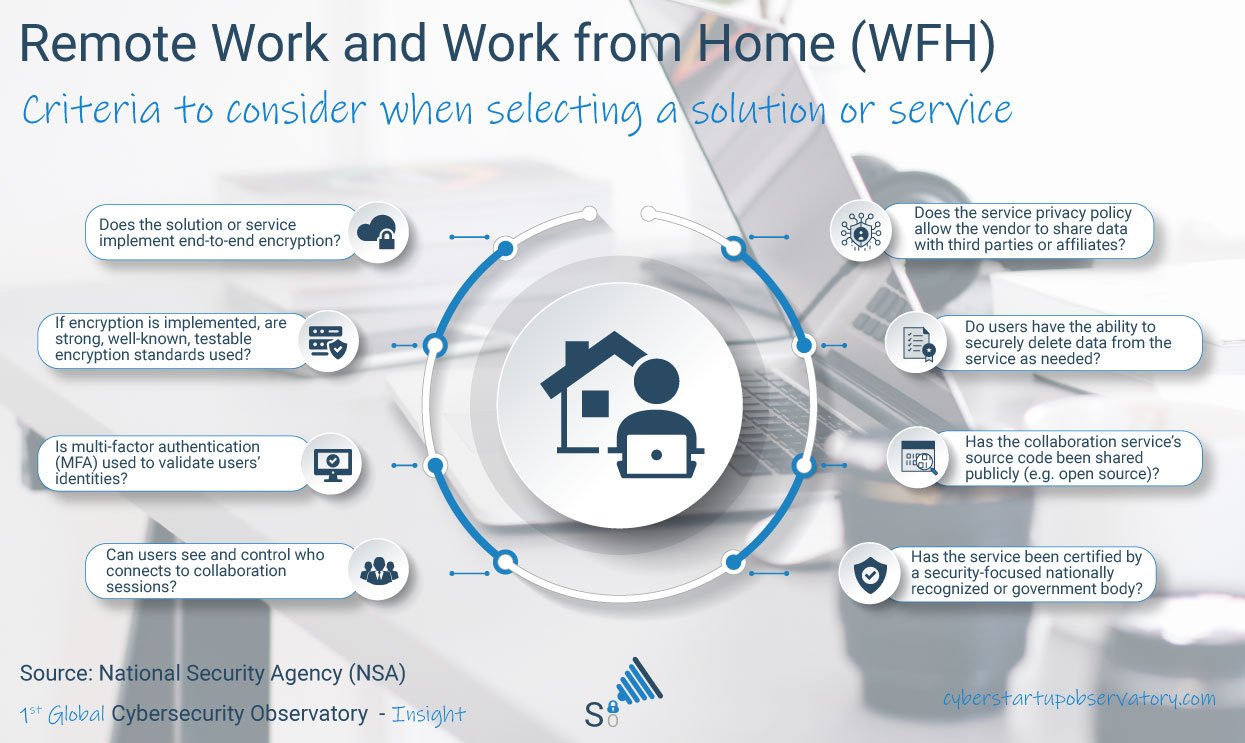
Among the security features and characteristics that we must require from collaboration solutions and services, we highlight:
- End-to-end encryption (E2EE)
- Multiple Factor Authentication (MFA)
- Guest Control: who accesses and with what permissions
- Sharing of supplier data with third parties. We must understand what happens to our data, especially in cases of sensitive or confidential information
- Ability to erase data both on the client and server side
- Degree of compliance with privacy and data protection regulations
- In cases where the information is stored in the cloud, it is important to know under which jurisdiction our data is located.
A study of these characteristics will allow us to select a solution that suits our risk profile.
But the work does not end here. It is essential that we use the selected application or service in a safe and responsible manner. To do this, we must ensure that:
- We only download applications from a trusted website
- We must ensure that encryption is enabled
- We must assign a secure password to the sessions and control who connects
- It is important to ensure that the information shared is suitable for all participants
Now we understand the characteristics that we should require in collaboration solutions and services, as well as the guidelines to follow in order to select the appropriate solution and use it safely, let’s go on to list our selection of solutions.
Collaboration solutions and services you should know
 Amazon Chime is a communication service that enables you to meet, chat, and make business calls inside and outside your organization, all with a single application.
Developers can use the same communications infrastructure and services that power Amazon Chime. Additionally, they can add audio calling, video calling, and screen sharing capabilities directly to their applications with the Amazon Chime SDK.
Zoom provides solutions for chat, voice and video conferencing, rooms and workspaces, call system, video webinars and a Marketplace app.
There are sector solutions for Education, Finance, Government and Healthcare. It enables end-to-end encryption as well as Multiple Factor Authentication (MFA).
 Cisco Webex Teams helps accelerate projects, develop better relationships, and solve business challenges. It has all the team collaboration tools you need to keep work moving forward, and it connects with the other tools you use to simplify your work: chat, meetings, whiteboarding, planning, and file sharing. Cisco Webex offers end-to-end encryption, and administrators can manage corporate or personal devices with controls such as PIN lock and the ability to wipe data if a device is lost.
Additionally, users can keep teamwork private by locking spaces so that only moderators can add others. Webex Teams integrates with Data Loss Prevention (DLP) tools, including Cisco Cloudlock, to protect sensitive information even when users are working with others outside of the company, or even to prevent users from sharing files, to maintain company data policies.
 Google G Suite includes mail, Gmail, Meet - the video conferencing solution that relies on Google’s global infrastructure, productivity tools - Docs, Calendar, Drive - and all this integrated with Google security: data, devices and users are protected and files are automatically saved in the cloud.
 GoToMeeting is a simple and secure conferencing solution. It uses strong encryption to guarantee the integrity, confidentiality and authenticity of the information transmitted.
It uses the LogMeIn infrastructure and allows a centralized management of user permissions, provides integration with Active Directory as well as multiple modes of integration with Single Sign-On.
Jitsi Meet provides secure video conferencing, with a wide variety of functionalities and is completely free. It is an open source, fully encrypted solution that does not require account creation.
You can turn on end-to-end encryption (e2ee) as long as you are using Jitsi Meet on a browser with support for insertable streams.
 Mattermost is a secure, flexible and open source collaboration platform that enables organizations to create intuitive workflows and large workgroup collaboration without worrying about data security or privacy.
It can be implemented in a private cloud or in the company’s infrastructure - on-prem, for total control of the data.
 Microsoft Teams incorporates the functionality of chat, meetings, calls and collaboration (Word, PowerPoint and Excel).
End-to-end encryption (E2EE), Multiple Factor Authentication (MFA) and user access control are available to ensure the security of interactions.
 Skype for Business available for Windows, Mac, iOS and Android provides functionality for text, voice and video conferencing, file and screen sharing. It enables end-to-end encryption as well as Multiple Factor Authentication (MFA).
Slack was created to meet the needs of global organizations and enables centralized management of all users and teams. By keeping all your conversations and tools in the same place, teams working remotely will remain productive no matter where you’re working from.
It has advanced functionality to protect data - Enterprise Key Management (EKM), Data Loss Prevention (DLP), identity and device management - Single Sign-On, Enterprise Mobility Management (EMM) - and information governance.
 Wickr positions itself as the safest and most respectful of privacy. It has end-to-end encryption (E2EE), scalability for any size of company, SSO support, secure file transfer and MDM integration.
 Quip is a Salesforce productivity platform that transforms the way companies work and achieves modern, agile collaboration from any device. Quip lets you replace email and siloed information with productivity tools that connect teams and accelerate delivery.
 Mitel allows you to maintain productivity and business continuity, stay connected with employees, partners and customers by offering your workforce the current remote work technologies that make it easier for teams to stay productive wherever they are.
 NetExplorer Cloud Platform enables you to optimize time management while promoting collaboration within your company. Teamwork can be essential in managing your projects.
With NetExplorer, enjoy a common ergonomic workspace that makes it easy to track projects, communicate, and share documents.
8×8 enables your employees to collaborate on any device, across the organization, even when they are on the move or around the world.
The platform includes Chat, Video Conferencing, Cloud Phone, Contact Center and APIs to extend the functionality.
Disclaimer
The Cybersecurity Observatory does not endorse any vendor, product or service depicted in its research publications, and does not advise technology users to select only those vendors with the highest ratings or other designation. The Cybersecurity Observatory research publications consist of the opinions of our own analysts and should not be construed as statements of fact.
No formal testing was performed on products or services for this analysis. These assessment findings are meant to serve as an input for our audience and their organizations. Users of these services must exercise judgement when choosing a service for their particular mission or telework needs.
We disclaim all warranties, expressed or implied, with respect to this research, including any warranties of merchantability or fitness for a particular purpose.
All product names, logos, and brands are property of their respective owners. All company, product and service names used in this website are for identification purposes only.
Follow Us